
This is an old revision of the document!
Table of Contents
Ozone Level Definition
Level 0
Are the O3 and SO2 comming from the Direct Sun measures from the Brewers. Some considerations:
- Standard Algorithm (as related in the BREWER MKIV SPECTROPHOTOMETER OPERATOR'S MANUAL (OM-BA-C231 REV B, August 15, 1999 [Appendix G])
- Observations are not processed, are taken directly from B files.
- Values for O3 and SO2 come from the Direct Sun measures directly from the parsed B files
- Constants and values used in the process come from the B file inst section (stored in the Brewer)
- O3 and SO2 temperature coefficients, Neutral Density Filters…
- Fixed Values: Interval Scaling, Rayleigh Coefficients…
Level 1
Are the O3 and SO2 recalculations with the standard algorithm from the Direct Sun measures and applying a verified by an operator set of constants. Some considerations:
- The calulations use Brewer Python Module which implement the Standard Algorithm (the BREWER MKIV SPECTROPHOTOMETER OPERATOR'S MANUAL (OM-BA-C231 REV B, August 15, 1999 [Appendix G]).
- Values for O3 and SO2 come from the calculation of the Standard Algorithmn using Raw Counts from the Direct Sun measures and the Temperature from the Direct Sun Summaries.
- with the exception of location of the measurement (Latitude, Longitude and Pressure) the configuration constants and values used in the process come from the Configurations uploaded and validated to the system by the Operators.
- Latitude, Longitude and Pressure are taken from the B inst section of the B file.
The process
- Get the DS and DS summaries measures of the day (coming from B file). If there are not available data, stop process.
- Get the last available configuration with date equal or earlier. If there is not a available configuration, stop process.
- Calulate the O3 and SO2 using the Brewer Python Module.
- Group the individual measures in groups of fives and calculate standard deviation.
- Store them into database.
Database
| ozone_product_1_0 Table | |||
|---|---|---|---|
| Field | Description | Unit | Reference |
| brewerid | Brewer identification number | db.brewer_t | |
| gmt | UT time of the measure in ISO 8601 format | GMT | ISO 8601 |
| configid | Configuration identification Numer | db.configs_t | |
| n_sum | Index of the daily summary | ||
| date_index | Continuous date index (0.0 = 0000-00-00T00:00:00Z) based in Matlab datenum | days | db.b_ds_t.date.toordinal + 366 + db.b_ds_t.mmmm_gmt / SECONDS_IN_A_DAY |
| sza | Solar zenith angle using time function | Degrees | Brewer Python Module (Solar Zenith Angle) |
| airmass | Calculated airmass using time function | Brewer Python Module (Brewer Airmass) | |
| temperature | Instrument temperature | Degrees | db.b_ds_summary_t.temp |
| filt | Applied neutral density filter | db.b_ds_t.nd_filter_position / 64 | |
| o3 | Calculated Ozone value with Standard algorithm + attenuation filter correction Ozone Level 1 | Dobson Units | Brewer Python Module (o3_so2) |
| std_o3 | Standard deviation of the group of measures | Dobson Units | Brewer Operator Manual (Section 9.2.6) |
| so2 | Calculated so2 value with Standard algorithm + attenuation filter correction | Dobson Units | Ozone Level 1 |
| std_so2 | Standard deviation of the group of measures | Dobson Units | Brewer Operator Manual (Section 9.2.6) |
| latitude | Latitude of the Brewer Location | Degrees | db.b_t, db.configs_t |
| longitude | Longitude of the Brewer Location | Degrees | db.b_t, db.configs_t |
| press | Medium Pressure of the Brewer Location | Milibars | db.b_t, db.configs_t |
| ms8 | First double ratio | Brewer Python Module (o3_so2) | |
| ms9 | Second double ratio | Brewer Python Module (o3_so2) | |
| f1 | Corrected Operational-Wavelength counts per second for slit 1 (includes only instrumental corrections, does not include the Rayleigh correction) | Brewer Operator Manual (Appendix G) | |
| f2 | Corrected Operational-Wavelength counts per second for slit 2 (includes only instrumental corrections, does not include the Rayleigh correction) | Brewer Operator Manual (Appendix G) | |
| f3 | Corrected Operational-Wavelength counts per second for slit 3 (includes only instrumental corrections, does not include the Rayleigh correction) | Brewer Operator Manual (Appendix G) | |
| f4 | Corrected Operational-Wavelength counts per second for slit 4 (includes only instrumental corrections, does not include the Rayleigh correction) | Brewer Operator Manual (Appendix G) | |
| f5 | Corrected Operational-Wavelength counts per second for slit 5 (includes only instrumental corrections, does not include the Rayleigh correction) | Brewer Operator Manual (Appendix G) | |
| configdate | UT Date of the used configuration in ISO 8601 format | GMT | db.b_t, db.configs_t |
| configtype | Type of the used configuration: B header(1), ICF (2), Config (3) | db.b_t, db.icf_t db.configs_t | |
| process_date | Date and time when the product was processed | GMT | ISO 8601 |
Level 1.5 REALTIME OBSERVATION
They are level 1.0 observations with filter and corrections Level 1.0 O3 and SO2 observations
The list of config values and where to find them in the upload form can be found in Eubrewnet Configuration.
Filters
- Filtered by ozone standard deviation.
- o3ds and o3ds_maxstd values have to be set in config
- If not, a default value for std of 2.5 is used
- For other measurements (ZS, FZ, FM, …) you can set specific thresholds in Data and Metadata → Data Processing → Rejection Criteria. A std of 4 is used by default for ZS measurements.
- Filtered by ozone slant column / air mass
- For DS measurements, mu_ds and mu_ds_value values have to be set in config
- If the limits are defined, they are used.
- If not, the following default values are used:
- Single (no stray correction): 3.5
- Single (with stray correction): 6
- Double: 6
- For other ozone measurements in which the Stray Light correction is not defined (ZS, FZ, FM, …), 3.5 is the default value for Single Brewers, and 6 for Doubles. You can also set a specific value in Data and Metadata → Data Processing → Rejection Criteria
- The measures has valid hg (step change lees than 2) before and after (see Brewer Python Module (Check HG).
- Filtered by Minimun Values: lesser Ozone values than Maximun are discarded
- Min value is set to 100
- Filtered by Maximun Values: greater Ozone values than Maximun are discarded
- Max value is set to 500
- Filtered by the Exclusion List: measurements taken at a date and time included in the Exclusion List are discarded.
Corrections
- Standard lamp correction
- sl_o3_cor has to be set in config for calculate Standard Lamp Correction (Default)
- If not, Standard Lamp correction is not applied
- Filter correction: ETC filter dependent correction
- etc_cor_fX value has to be provided in config (X filter)
- If not or 0.0 value, ETC filter dependent correction is not applied
- Stray Light correction
- stray_light_a and stry_light_b values has to be set in config
- If not provided or both of them are 0.0, straylight correction is not applied
Two Flags have been added to the O3 and SO2 for filter a correction representation:
| Flag type | Flag name | Description | Value |
|---|---|---|---|
| Data filter | FLAG_OZONE_STD_FILT | Ozone standard deviation | 1 |
| Data filter | FLAG_AIRMASS_FILT | Max airmass | 2 |
| Data filter | FLAG_HG_FILT | Valid HG | 4 |
| Data filter | FLAG_MIN_FILT | Min Ozone Value | 8 |
| Data filter | FLAG_MAX_FILT | Max Ozone Value | 16 |
| Data filter | Exclusion List | 32 | |
| Correction Flag | Standard Lamp | 1 | |
| Correction Flag | ETC filter dependent | 2 | |
| Correction Flag | Straylight | 4 |
Flag Process
In case of Filter flag, the process of setting it works as related below:







- The Group of measures is discarded if at least one of the flags is not 0
In case of Correction flag, the process of setting it works as related below:



The Process
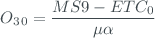
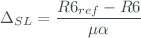
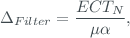
This function computes O3 and SO2 amount from Brewer measurements:


- The
 is the Level 1 ozone
 - The SL correction use the R6 reference value and the measure SL is smoothing using a Triangular moving average filter (see Brewer Python Module (Triangular Moving Average))
- The ETC filter correction is applied using the ETC correction function, the correction
 only affects to the measurements performed with filter #N
 - The Stray Light ETC filter correction as depend of he ozone is an iterative process, in most cases only one iteration is needed (OSC<1600 DU) and is enough with two iterations for all the cases (up to OSC 2000DU). On the database two iterations are defined by default.
- The configuration parameters A y B assume that osc ($\mu *O_3$) are in DU/1000.
- We assume that the A parameter is negative in the configuration.

Database
Ozone Level 1.5
| ozone_product_1_5 Table | |||
|---|---|---|---|
| Field | Description | Unit | Reference |
| brewerid | Brewer identification number | db.brewer_t | |
| gmt | UT time of the measure in ISO 8601 format | GMT | ISO 8601 |
| configid | Configuration identification Numer | db.configs_t | |
| n_sum | Index of the daily summary | ||
| date_index | Continuous date index (1.0 = 0001-01-01T00:00:00Z) based in python date.toordinal | days | db.b_ds_t.date.toordinal + db.b_ds_t.mmmm_gmt / SECONDS_IN_A_DAY |
| sza | Solar zenith angle using time function | Degrees | Brewer Python Module (Solar Zenith Angle) |
| airmass | Calculated airmass using time function | Brewer Python Module (Brewer Airmass) | |
| temperature | Instrument temperature | Degrees | db.b_ds_summary_t.temp |
| filt | Applied neutral density filter | db.b_ds_t.nd_filter_position / 64 | |
| o3 | Calculated Ozone value with Standard algorithm + attenuation filter correction + config corrections Ozone Level 1.5 | Dobson Units | Brewer Python Module (o3_so2_sl) |
| std_o3 | Standard deviation of the group of measures | Dobson Units | Brewer Operator Manual (Section 9.2.6) |
| so2 | Calculated so2 value with Standard algorithm + attenuation filter correction Ozone Level 1.5 | Dobson Units | Brewer Python Module (o3_so2_sl) |
| std_so2 | Standard deviation of the group of measures | Dobson Units | Brewer Operator Manual (Section 9.2.6) |
| latitude | Latitude of the Brewer Location | Degrees | db.b_t, db.configs_t |
| longitude | Longitude of the Brewer Location | Degrees | db.b_t, db.configs_t |
| press | Medium Pressure of the Brewer Location | Milibars | db.b_t, db.configs_t |
| o3_0 | Calculated Ozone value with Standard algorithm + attenuation filter correction Ozone Level 1 | Dobson Units | Brewer Python Module (o3_so2) |
| so2_0 | Calculated so2 value with Standard algorithm + attenuation filter correction Ozone Level 1 | Dobson Units | Brewer Python Module (o3_so2) |
| r6 | Standard Lamp Double Ratio 2 | Brewer Python Module (Triangular Moving Average) | |
| r6_ref | Ozone value for Standard Lamp of Reference (Double Ratio 2) | db.configs_t.r6_ref | |
| r5 | Standard Lamp Double Ratio 1 | Brewer Python Module (Triangular Moving Average) | |
| r5_ref | Ozone value for Standard Lamp of Reference (Double Ratio 1) | db.configs_t.r5_ref | |
| filter_flag | APPLIED FLAGS: HG Filter, Max Airmass, O3 std (1 means True) | Level 1.5 Realtime Observation | |
| correction_flag | APPLIED CORRECTIONS: Straylight, ETC Correction, Standard Lamp correction(1 means True) | Level 1.5 Realtime Observation | |
| configdate | UT Date of the used configuration in ISO 8601 format | GMT | db.b_t, db.configs_t |
| configtype | Type of the used configuration: B header(1), ICF (2), Config (3) | db.b_t, db.icf_t db.configs_t | |
| process_date | Date and time when the product was processed | GMT | |
Level 2.0
Level 2.0 are 1.5 observations validated with a posterior calibration. The brewer instrument use the measurements of the internal halogen lamp to track the Ozone calibration, but is usually difficult to know if the changes recorded by the SL test are due to changes on the lamp or real changes on the instrumental response. Only with a subsequent calibration/comparison we can validate the SL correction.
The Level 2 data are produced when the operator activates the verification flag and validates (assign to level 2) the observations data between the current calibration and the previous verified one.
WOUDC extCSV files
EUBREWNET can generate files with monthly data in the extCSV format requested by the WOUDC (see https://guide.woudc.org/en/)
To generate the WOUDC files, use the URL http://eubrewnet.aemet.es/eubrewnet/woudc/csv with the following arguments:
brewerid: Brewer serial number.
date: month to process, in the formatYYYY-MM,lastfor the last month according to today's date.
For example, use
http://eubrewnet.aemet.es/eubrewnet/woudc/csv?brewerid=157&date=2019-01
to get Brewer #157's highest level data (1.5 near real time, 1.6 consolidated NRT, or 2.0 final) for January 2019.
Note that EUBREWNET's 1.5, 1.6, and 2.0 data levels correspond to WOUDC's level 1.0 (see https://guide.woudc.org/en/#321-introduction). Files generated by EUBREWNET and submitted to the WOUDC will hence be stored at https://woudc.org/archive/Archive-NewFormat/TotalOzone_1.0_1/ (The WOUDC level in EUBREWNET's files was changed from 2.0 to 1.0 in August 2024)
The following arguments are optional:
- Instead of
brewerid, you can use one ofgaw_id,woudc_id, orstationidto request the data for a station instead of a Brewer.stationidcorresponds to the internal EUBREWNET ID of the station. Note that the Brewer and station products might be different if more than one Brewer operates at a station.
version: this is EUBREWNET's processing algorithm version. If not specified, version1.0is used (note this is the only version available to the public as of April 2020)
file_version: this is used in the Data Generation Version field of the extCSV file (see https://guide.woudc.org/en/#32-the-woudc-extcsv-data-file-metadata), and is written asmajor_version.minor_version. If not specified, the file version is automatically determined depending on whether a file for the same date is already available at the WOUDC:- if the file exists, the
minor_versionwill be increased by1(e.g., if the existing file is version3.2, the new file will be3.3) - if no file exists,
file_versiondefaults to EUBREWNET's processing algorithm version, which itself defaults to1.0(see above)
GEOMS HDF files
It is also possible to generate HDF files with monthly data in the GEOMS format (see https://evdc.esa.int/documents/1/geoms-1.0.pdf) accepted by the NDACC, AVDC, and other data centers.
To generate the GEOMS files, use the URL http://eubrewnet.aemet.es/eubrewnet/geoms/hdf with the following arguments:
brewerid: Brewer serial number.
date: month to process, in the formatYYYY-MM
level: EUBREWNET product level to be included in the file, either 1.5 or 2.0
For example, use
http://eubrewnet.aemet.es/eubrewnet/geoms/hdf?brewerid=157&date=2019-02&level=1.5
to get Brewer #157's L1.5 data for February 2019.
The following arguments are optional:
- Instead of
brewerid, you can use one ofgaw_id,woudc_id, orstationidto request the data for a station instead of a Brewer.stationidcorresponds to the internal EUBREWNET ID of the station. Note that the Brewer and station products might be different if more than one Brewer operates at a station.
version: this is EUBREWNET's processing algorithm version. If not specified, version 1.0 is used (note this is the only version available to the public as of April 2020)
file_version: this is used to fill theDATA_FILE_VERSIONglobal attribute of the HDF file (see https://evdc.esa.int/documents/1/geoms-1.0.pdf, page 17, section 4.2.9). If not specified, it defaults to001
file_access: this is used to fill theFILE_ACCESSglobal attribute (see https://evdc.esa.int/documents/1/geoms-1.0.pdf, page 20, section 4.3.3). If more than one data center is specified, please separate their acronyms using only commas, e.g.AVDC,NDACC(do not use semicolons!AVDC;NDACCwill not be interpreted correctly by the server!). If not specified, it defaults toNDACC
individual: write all individual measurements instead of daily means
You can check the GEOMS-HDF files using the AVDC GEOMS QA checker available at https://avdc.gsfc.nasa.gov/index.php?site=1473794367
NDACC AMES files
EUBREWNET can also generate AMES files with monthly data in the format specified by NDACC (see http://ndaccdemo.org/data/formats)
To generate the AMES files, use the URL http://eubrewnet.aemet.es/eubrewnet/ndacc/ames with the following arguments:
brewerid: Brewer serial number.
date: month to process, in the formatYYYY-MM
level: EUBREWNET product level to be included in the file, either 1.5 or 2.0
For example, use
http://eubrewnet.aemet.es/eubrewnet/ndacc/ames?brewerid=157&date=2019-02&level=1.5
to get Brewer #157's L1.5 data for February 2019.
As of September 2020, the error fields have a fixed value corresponding to 1% of the observation values.
The following arguments are optional:
- Instead of
brewerid, you can use one ofgaw_id,woudc_id, orstationidto request the data for a station instead of a Brewer.stationidcorresponds to the internal EUBREWNET ID of the station. Note that the Brewer and station products might be different if more than one Brewer operates at a station.
version: this is EUBREWNET's processing algorithm version. If not specified, version 1.0 is used (note this is the only version available to the public as of September 2020)
qualityflag: this is the 4-bytes value to write at the end of the first line in the NDACC file (see https://www.ndsc.ncep.noaa.gov/data/formats/header/#DFlag). Defaults to0001
individual: write all individual measurements instead of daily means